
Salary processing is rarely as simple as calculating an employee’s regular monthly pay. Changes in salary, missed allowances, overtime corrections, revised deductions, promotions, backdated increments, or attendance corrections can create differences between what an employee should have received and what was actually paid. These differences are commonly handled as salary arrears or payroll adjustments.
For HR and finance teams, managing such changes manually can become difficult, especially when several employees are involved. Payroll Calculation Software helps businesses automate these calculations, maintain accurate employee records, and process corrections in a structured way. Modern payroll platforms can also connect attendance, leave, salary structures, deductions, and payslip generation within one workflow.
For businesses looking to reduce repetitive payroll work, improve salary accuracy, and simplify monthly processing, solutions such as Gopareto can provide a centralized approach to payroll management.
What Are Salary Arrears and Payroll Adjustments?
Salary arrears are amounts that become payable to an employee because a salary-related change applies to an earlier payroll period.
For example, imagine an employee receives a salary revision effective from April, but the revised salary is approved and processed in June. The difference between the original salary paid for April and May and the revised amount due for those months becomes an arrear.
Payroll adjustments are broader. They can include corrections related to:
Handling these calculations correctly matters because even a small adjustment can affect gross salary, deductions, taxes, statutory contributions, and the employee’s final net pay.
Why Managing Salary Arrears Manually Can Become Complicated
A payroll team may initially handle one or two corrections using spreadsheets. However, the process becomes more complicated when corrections involve multiple months or employees.
Consider a salary increment that is effective from an earlier date. The payroll team may need to identify the previous salary, calculate the revised salary for each affected month, determine the difference, review applicable deductions, and then include the final arrear amount in the appropriate payroll cycle.
A manual process can also create duplicate entries or calculation inconsistencies.
This is where Payroll Calculation Software can make the process more organized. Instead of repeatedly calculating every component from scratch, payroll rules and employee salary information can be maintained digitally, allowing HR teams to process adjustments more systematically.
How Payroll Calculation Software Calculates Salary Arrears
Identifying the Effective Date
The first step in an arrear calculation is identifying when the salary change became applicable.
For example, an employee may receive a promotion effective from 1 April, while the payroll update takes place in June. The software can use the effective date and salary information to identify the affected payroll periods.
This prevents HR teams from relying entirely on memory or manually checking multiple spreadsheets.
Comparing Previous and Revised Salary
The system can compare the employee’s previous salary structure with the revised structure.
Suppose an employee was previously entitled to ₹40,000 per month and the revised salary is ₹45,000 from an earlier effective date. The difference needs to be calculated for each applicable period.
The important point is that arrears are not simply an additional random payment. They represent a correction or difference arising from an earlier payroll calculation.
Applying Attendance and Leave Information
Salary adjustments can sometimes depend on attendance, leave, overtime, or working days.
A modern payroll platform can integrate attendance and leave information with payroll processing. GoPareto, for example, provides attendance and leave integration as part of its payroll solution.
This can help reduce the need to manually copy attendance figures between different systems.
Recalculating Applicable Payroll Components
A salary revision may affect more than the basic salary.
Depending on the organization’s salary structure, a correction may influence allowances, deductions, taxes, overtime, reimbursements, or other payroll components.
Payroll Calculation Software can process these components according to configured payroll rules, helping HR teams maintain consistency across calculations.
Calculating the Final Arrear Amount
After comparing the original payroll amount with the corrected amount, the system can determine the difference that needs to be included as an arrear.
The actual payable amount may differ after applicable payroll deductions and rules are considered.
Including the Adjustment in Payroll
Once the arrear is reviewed and approved, it can be incorporated into the relevant payroll cycle.
This approach creates a clearer connection between the original salary, revised salary, adjustment amount, and final payroll result.
Common Payroll Adjustments Businesses Need to Handle
Salary arrears are only one type of payroll correction. HR teams may encounter many other adjustments throughout the year.
Backdated Salary Increments
An employee may receive a salary increase that becomes effective from a previous month. The difference between the old and revised salary may need to be calculated as arrears.
Attendance Corrections
An employee’s attendance record may be corrected after payroll has already been processed. The correction can affect payable days and salary.
Overtime Adjustments
If approved overtime was missed during an earlier payroll cycle, the amount may need to be added during a later cycle.
Allowance Corrections
An allowance may have been entered incorrectly or omitted. Payroll adjustments can help correct the difference.
Deduction Corrections
Incorrect deductions can also require a payroll adjustment. The correction should be properly recorded so that the employee’s payslip reflects the updated calculation.
Reimbursement Adjustments
Approved employee reimbursements that were missed or incorrectly processed may need to be included in a subsequent payroll cycle.
How Payroll Software Pune Businesses Can Benefit from Automation
For growing organizations, payroll becomes increasingly difficult to manage through disconnected spreadsheets. Businesses need a system that can handle employee records, salary structures, attendance, deductions, payroll calculations, and reporting in a more centralized manner.
Payroll Software Pune businesses use should ideally support their actual payroll workflow rather than simply replacing a spreadsheet with another digital interface.
For Pune-based startups, SMEs, agencies, IT companies, retail businesses, and growing enterprises, automation can reduce repetitive payroll administration and provide HR teams with better visibility into salary processing.
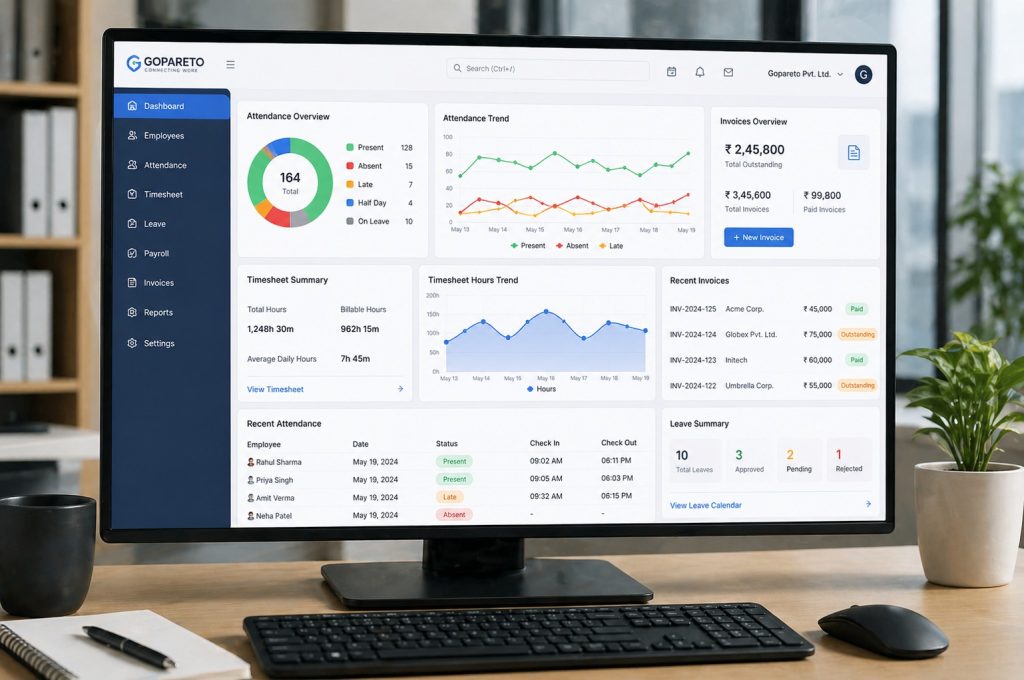
Gopareto provides cloud-based payroll functionality designed for businesses managing different employee and salary requirements. Its platform includes automated salary calculations, attendance and leave integration, digital payslips, compliance-related payroll features, reporting, and centralized payroll management.
Benefits of Using Payroll Calculation Software for Adjustments
🎯 Better Accuracy
Automated calculations can reduce repetitive manual calculations and help apply predefined payroll rules consistently.
⚡ Faster Payroll Corrections
Instead of rebuilding calculations across multiple spreadsheets, payroll teams can process changes through a centralized system.
📋 Clear Salary Records
Maintaining organized employee salary information makes it easier to understand why a particular adjustment was made.
🧾 Easier Payslip Generation
Once payroll is processed, digital payslips can provide employees with clearer salary information. Gopareto supports digital payslip generation as part of its payroll capabilities.
👀 Improved Payroll Visibility
A centralized dashboard can help HR and finance teams monitor payroll status, salary summaries, and employee compensation information.
🛠️ Reduced Administrative Work
Automating repetitive payroll calculations allows HR and finance professionals to spend less time manually checking figures and more time handling higher-value responsibilities.
What Should Businesses Check Before Processing an Arrear?
Automation is helpful, but payroll adjustments should still be reviewed carefully. Before finalizing an arrear, payroll teams should verify:
A good payroll workflow combines automation with appropriate human review.
Why Gopareto Can Simplify Modern Payroll Management
Gopareto is designed to bring payroll-related processes into a centralized digital environment. Its payroll solution supports automated salary calculations, attendance and leave integration, deductions, payslip generation, payroll reporting, and cloud-based access.
For businesses that regularly manage salary revisions, employee changes, attendance records, or payroll corrections, having these processes connected can make payroll administration more organized.
The platform is positioned for startups, SMEs, agencies, retail businesses, manufacturing companies, and other growing organizations that need scalable payroll management.
Frequently Asked Questions
1. How does Payroll Calculation Software handle salary arrears?
Payroll Calculation Software can compare an employee’s original salary with the revised salary for the affected period and calculate the resulting difference. The adjustment can then be included in the appropriate payroll cycle after review.
2. Can Payroll Calculation Software handle backdated salary increments?
Yes. Payroll Calculation Software can support backdated salary changes by using the effective date, previous salary, revised salary, and affected payroll periods to determine the applicable adjustment.
3. Is Payroll Software Pune suitable for small businesses?
Yes. Payroll Software Pune can be useful for small and growing businesses that want to reduce spreadsheet dependency, organize employee salary information, and automate repetitive payroll activities.
4. Can Payroll Calculation Software correct attendance-related salary errors?
Payroll Calculation Software can use attendance and leave information when calculating payroll. If an attendance correction changes the employee’s payable salary, the corresponding adjustment can be processed through the payroll workflow.
5. Does Payroll Software Pune help with employee payslips?
Modern Payroll Software Pune solutions can generate digital payslips after payroll processing. Gopareto includes digital payslip generation within its payroll capabilities.
Conclusion:
Salary arrears and payroll adjustments are a normal part of managing a growing workforce, but handling them manually can consume valuable HR and finance time. From backdated increments and attendance corrections to missed allowances and deduction changes, every adjustment needs to be calculated and recorded carefully.
Using Payroll Calculation Software can help businesses create a more systematic process for identifying differences, recalculating salary components, processing adjustments, and generating updated payroll records.
For businesses searching for Payroll Software Pune, Gopareto offers a centralized, cloud-based approach to salary processing, attendance integration, payroll calculations, compliance-related workflows, and digital payslips.
Make Payroll Management Simpler with Gopareto
Take the complexity out of salary calculations, deductions, and payroll adjustments with a more organized approach. Connect with Gopareto to explore smarter payroll management and discover how Payroll Calculation Software can support accurate, efficient payroll processing.